Showing posts with label inspiration. Show all posts

Monday, 13 April 2020

Using Digital Slides on Google Classroom

The way we teach and set up classwork has changed dramatically since the start of the year. We've been forced to adapt to going digital and use platforms in ways that we've never used them before.

Digital resources have become the norm, this doesn't have to be scary and it doesn't mean we can no longer use the fun and engaging resources we used to use in our classrooms.

I've been creating lots of digital slides to adapt to this change and have been receiving lots of questions about how to use them on various platforms. Here is a step by step tutorial for assigning slides on Google Classroom. This tutorial works for any slideshow resource that has permission for online use.


Step #1 - Prepare the file for assigning
Some files are ready to go and some files require a small amount of prep. This can range from deleting the first few credit pages, duplicating pages and creating additional questions.

Step #2 - Create the task and assign
Click on 'Classwork' at the top
Click 'Create' and then 'Assignment'

Fill in the fields. You can choose to leave the instructions field blank, I like to give students instructions on how to edit the file in Google Slides.

Make sure you choose 'Make a copy for each student'!


Click 'Assign' and you're done.

Now you've assigned your slide, it's time to get students using and submitting their work.

The tasks should appear in the class stream. Students can click on the task on the stream or by clicking on 'Classwork' at the top.

When students click on the task, they should see this. 'Tales From Miss D' will be replaced by the student's name.
Step #1 - Click on the file listed under 'Your Work'
This will open the file in 'View Mode'

Step #2 - Click on the three dots in the top, right corner and choose 'Open in a new window'

The file will then open in a new tab.

Step #3 - Click 'Open with Google Slides' at the top

This will open the file in a new tab, in Google Slides where the students can complete the activities.

Student work should save automatically as they are editing the slides.

Step #4 - Submitting Work
Once complete, students can close the file by closing the tab. They return to the original screen which looks like this;


To submit the work, students click 'Turn In'. A confirmation will pop up;

Students click 'Turn In' and the work will be submitted for you to view.

Once you've used this a few times, you and your students will become masters at Google Classroom. I've become a fan of digital tasks and can see myself continuing to use these even when we go back to 'normal' routine.

I hope this tutorial has helped you, as always if you have any questions, please reach out via any of my social media platforms and I will do my best to answer any questions.

Happy teaching,

Sunday, 21 January 2018

First Week of Kindergarten Ideas

The first week of Kindergarten is exciting but it can also be very tiring! I've been asked many times for some ideas on what to do during the first week to get students settled and into the routine of school. Here are some of my favourite things to do during that first week (or even couple of weeks).

Stories

Read lots and lots of books! Use it as a way to settle students in the morning, after break and just before hometime. Students love hearing stories and as numerous studies have shown, exposure to literature is vital for students' literacy and language development. 

I also like to use stories as a way of teaching students how to listen to and engage with a book. I know this might seem obvious and that students should already come to school knowing how to listen, but it's important that we set up our expectations on what listening to a story looks like. I like to do this in a simple manner by telling students that when I read a story, I have a job and they have a job too. My job is to read the story and the students' job is to listen. I then read the story with no additional commentary and any hand raises or interruptions are stopped. BUT WAIT?! What about the questioning and discussion? That all comes later once the listening and engagement has been taught explicitly.

Nursery Rhymes

Nursery Rhymes are another great way to start literacy in the classroom. They help students develop their ability to hear rhyme, syllables and sounds. I like to do a variety of activities which come in my Nursery Rhyme packs. These activities include sequencing, listening for rhyming words, looking for letters and making mini books. YouTube is a great source for video versions of the Rhyme.


Lining Up Game

The Lining Up Game is a fun way to teach students how to line up in two lines after break times. I take my students out to our lining up area to play this to make it as authentic as possible. How does it work? I get the kids to start by sitting in two perfect lines and explain that this is how they need to be sitting at the end of each break. For the game they just need to know two commands "play" and "bell's gone!". Play means they run around as if it's break time. "Bell's gone!" means they need to find a partner and make two lines. We play this over and over again until they consistently make two, straight lines with no pushing in/dramas. Positive feedback is a must and the more cheesy the better! e.g "YOU are the CHAMPIONS of lining up!", "You're going to make all the other teachers jealous!". Play this before each break for two days and you WILL have the best class at making two lines!

Number Crafts

I love doing craft activities, even during the first week of school! It's a great way to build a sense of fun and get students to start developing all the important fine motor skills they will need for the rest of the school year. These Number Crafts focus on numbers and colours. They're super cute and are perfect for decorating your classroom during the first few weeks.


Name Activities

Not every student in your class will come to school knowing how to write, spell or recognise their name so it's important to get ontop of that during the first term. I have name activities as part of rotations and students work on their names every day. I have two hands-on activities which can be found here and here. I also use magnetic letters and cut and paste activities. Changing it up keeps it interesting and engaging for students.


Pre-Number Skills

Pre-Number skills are essential in building the foundations for a deep understanding of numbers and how they work. I start off with Pre-Number activities from day one by incorporating these into rotations. Pre-Number skills include sorting, matching, ordering and comparing. I use a range of resources from math manipulatives in the classroom to games and activities that I've cut and laminated. 


Sorting games, more or less? and matching can be found by clicking on their names.

Rules and Expectations

Explicit teaching of rules and expectations is a must. Get these sorted in the first few weeks and your year will run smoothly. I have an in-depth post about that which you can read here.

Developmental Play

During the first week, the afternoon sessions are dedicated to Developmental Play. This is a great way for students to make friends with their classmates and to relax - remember they're probably just as tired as you! A new scene, routine, and people can be quite exhausting for the little ones. Play allows for social skills to be tested and developed while using imagination. I like to have unstructured play during the first week, so I can sit back and watch students interact with each other while making notes on what social skills need to be explicitly taught and which students might need some extra support socially.


These ideas will keep you going for the first week and help students settle into the routine of school. I hope you have found these ideas inspiring and have helped you plan for your first week of Kindergarten. Keep up with my teaching adventures by following my Social Media accounts: Facebook and Instagram.

Monday, 8 January 2018

Using my Teacher Planners Digitally

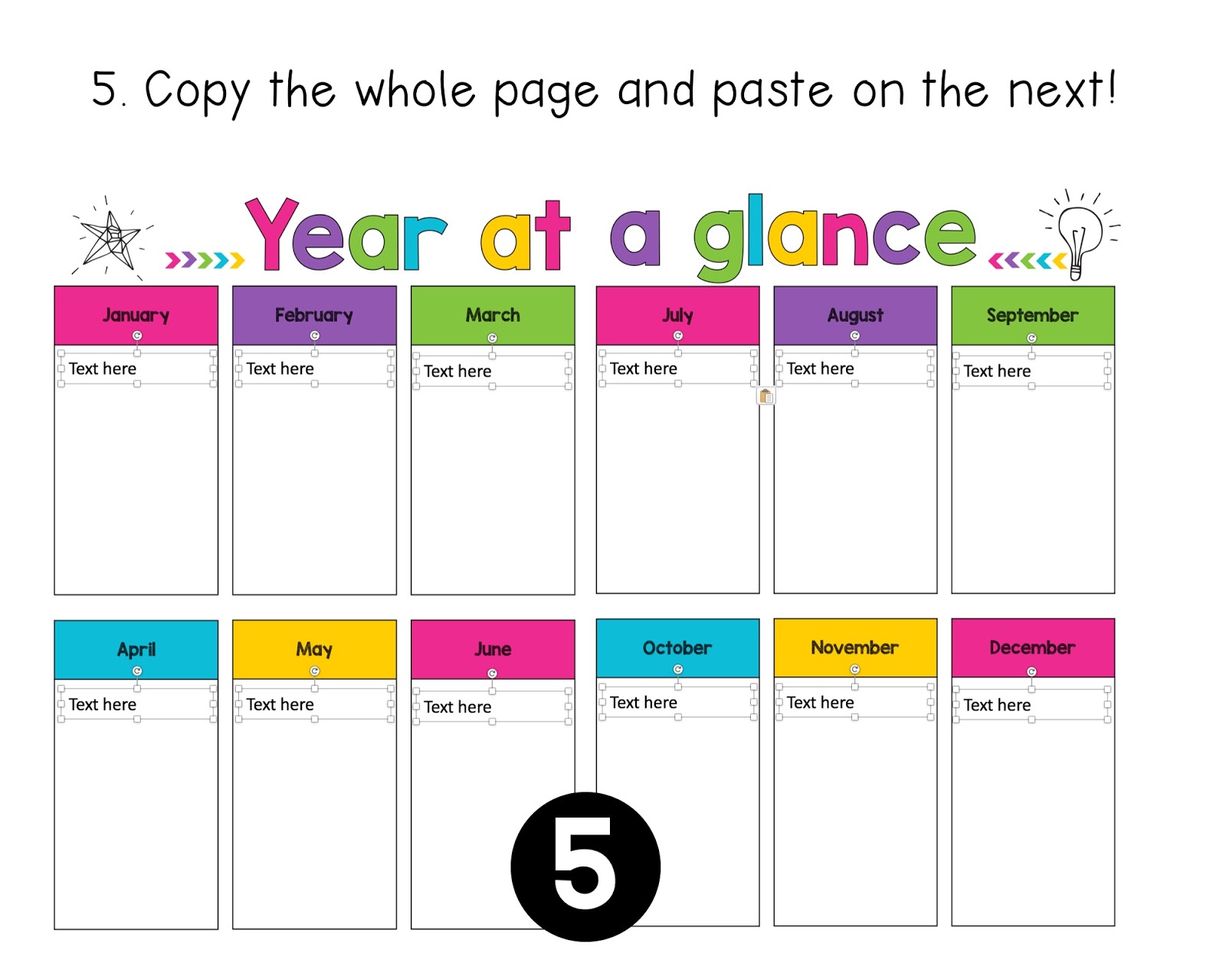
One of the most frequently asked questions I get about my teacher planners is whether they can be used digitally and if so how to set it up. I have not inserted text boxes as some would like to use it as a print and write planner and placing "text here" boxes would interfere with the printing. In order to use my planners digitally, you will need to insert your own text boxes. This might seem like a daunting task, but with these tips and tricks it's not as time-consuming as you would think.

Copy and Paste is your best friend!

A lot of the boxes are the same size and in the same position on each page, so once you have one page set up with the boxes, you can simply copy the text boxes and then paste them onto the next page.


Choosing the right font size

With a table, you can still use a text box and hit enter to move to the new lines. The key to this is choosing the right font size.


If your table has more than one column, simply copy and paste the text box across.


Alignment Lines

One of my favourite things about PowerPoint is the alignment lines that come up when you are dragging items around. These are super useful for making sure that things are lined up properly and evenly spaced.


Here is a visual on how to set up the weekly pages.


I hope this helps you in setting up a digital version of your planner. As always if you have any questions please send me an email or leave a question on my TPT Store!

Friday, 14 July 2017

Writing Rubrics

Writing is my favourite session of the day so I'm super excited to start using these writing rubrics in the new school term!

Providing feedback to students about their progress towards their goals has always been a vital part of the writing session. It usually happens at the end as part of the 'sharing circle'. This is where students read their work to the class and then I provide feedback about their work.

I decided to work on something to make providing feedback a lot easier. Say hello to Writing Rubrics!


These slips of paper come in two different designs; Checklist and Goals.

The Checklist Version contains a list of key writing goals such as spaces between words, capitals, full stops, hearing, recording and proofreading. I decided to level these rubrics to suit the different needs and abilities of the students in my class. Some students would receive a slip with three basic writing goals and others would receive one with five writing goals. The slips vary in the range of skills covered. When marking work, the slip is attached to the page and students receive a tick/stamp in the star for each goal demonstrated. I have made the checklist visual so that students can see and understand each point.


The goals version contains a "big picture" writing goal and then visual representations of other writing skills. Just like the checklist version, the slip is attached to the piece of work. Students receive a tick/stamp in each box that was demonstrated.


As you can see from the pictures, this makes marking and providing feedback easier. Students are also more likely to understand the feedback because it is very visual. These slips allow parents to see their child's progress and what skills they are working towards.

Like what you see? My Writing Rubrics can be found here.

Monday, 10 July 2017

Using Goals in the Classroom

I'm so excited to share this post! I've had the photos for ages all ready to go, but haven't really had the time to put this together...until now :)

"Student Goals", "Student Targets" you've probably heard these two terms thrown around a lot. It can be overwhelming having to incorporate this into everything else that we need to do as teachers. Maybe you're thinking "I don't have time for that!" or "Where on earth do I start?! HELP!". Guess what? It's super easy and will help keep you on track of your data and reporting requirements. Win!

Here is how I have successfully incorporated Student Goals in my classroom for the past two years.

#1 Bump it Up/Data/Goal Wall
These walls have multiple names but pretty much run on the same idea with minor variations. I have a wall for Numeracy, Reading and Writing.


The goals are all written in child-friendly language while still using the technical terms from the syllabus/continuum. Reading and Writing Goals are self-paced, meaning students move to different goals based on their needs and progression. There is no one set path that students progress in.

My Numeracy wall follows the same concept, however, there is a set progression.


I love my Goal Walls as it means that when I'm working with students I can simply look at the goals to see what they are specifically working on. These walls also come in handy during data and reporting time as I can refer to them to help me plot where my students are as these walls are constantly updated.

Added bonus; Students love moving their names from goal to goal!

You can find my Reading, Writing and Numeracy goals by clicking on their names :)

#2 Goal Cards
When working with students in Numeracy, I used to send home their target numbers on a post-it note in the hopes of their parents seeing it and then asking them to identify and count to the number. Only I realised that it wasn't very effective as my students are constantly taking home random pieces of paper and it was getting lost amongst all those. So I decided I needed something a bit more "official".

Goal cards to the rescue!


I had positive feedback from parents about these cards. They were happy be constantly informed about their child's progress and they used the cards to work with their child on what they were working on in class. I noticed a quicker progression as students were going home and working on what we had worked on in class. Yay!

Based on the success of the Numeracy Goal cards, I decided to branch out into other areas.


These cards are not just limited to sending home, you can stick them on desks, use them at rotational activities and clip in books!


With the letters and sounds cards, I stuck them on student desks and turned it into a game. If they can read or identify any one of their target letters they get a point for their table. This has become one of my class' favourite games and it's something so simple! It's also a great way of dismissing students to recess and lunch.

Another way of using goal cards is to clip them to workbooks. This serves as a visual reminder while students are working and eliminates the problem of having to flick through pages to find student work!


Goal cards are not just limited to academics, they can also be used for classroom etiquette. I use them for desk tidiness, chairs and following instructions.


Goal Cards are easy to use and set up. The numeracy, sounds and sight word cards are done in large batches and are updated as the need arises. The writing and etiquette goals are laminated and re-used.

My Individual Goals Card pack can be found here.

#3 Behaviour Goals
My school follows a PBIS/PBL System. So rules and behaviours are defined as being Safe, Respectful and Responsible.

I incorporated Behaviour Goals into my morning routine. These goals are based on the school expectations and use language that is used across the whole school. I change these once most of my class has demonstrated these behaviours on multiple occasions.

My Behaviour Goals can be found here.

Having goals displayed to and referred to on a daily basis has definitely strengthened my abilities as a teacher and helps drive my program so that it targets individual needs. Students are more aware of their learning and what they need to do in order to be able to progress.

I hope this post has inspired you and given you some ideas to try out in your classroom. For all things goal related click here.

Wednesday, 28 December 2016

Teacher Planner

It's that time of the year when I should be relaxing, but instead, I'm thinking abut next year. Isn't that the case for everyone? :P

One of my "must have" products for every year is a Teacher Planner. They're better than a standard diary because of the planning pages. However, most of the time I find that there are pages that I have no use for and then the pages that I want are not included. So this year, I decided to take the leap and make my own planner and I think it worked out pretty well.

Here are 10 reasons why I love my new planner - and you will too!

1) It's bright and modern!


If I have to look at this every day for the year, I need it to be visually appealing. Also being bright means it is harder to lose on my desk ;)

2) It has a 'Year at a Glance'


I find this more useful than the yearly calendar as I can write in the important dates for each month rather than circling a date and then forgetting why I circled it later on.

3) Birthdays and Class List


You'd be surprised how many times you randomly need these pieces of information. Saves time as I can just flip open to these pages rather than going on the computer to search.

4) Professional Development Tracker


Won't be losing this log anytime soon! (well unless I lose my diary :P)

5) Award Tracker


This is the only tracking sheet I like to keep in my diary, this helps ensure that every student receives an award by the end of the year. I like to divide it up by school terms and by award type.

6) It is divided up into Australian school terms


I've always had to use sticky notes to divide up my diary, but not anymore because it's done for me! Also #igotthis because this should be everyone's mantra at the start of a new school year!

7) It has a term overview


This can be used for curriculum topics or important days throughout the term. I like to map out both. 

8) Weekly pages on a double page spread


This is pretty standard across all planners. I like seeing the week planned out as a whole. The notes part on the side is a great place to make a to-do list.

9) It can be used YEAR AFTER YEAR


I haven't put any dates or years in my diary. Instead, I can handwrite it in the spaces provided. 

10) It is EDITABLE

I can duplicate or remove pages when needed. I can also type in whatever I need.

I can't wait to print and bind it. I'm feeling super organised already :D

You can get your own copy from my TPT store by clicking the picture below.


Sunday, 12 June 2016

Keeping Centers Under Control


Center work happens in my classroom every day. Together, my students and I have been working pretty hard on our routine since the beginning of the year. At this stage of the year, most of my students have grasped the concept of working independently. Though, there are still a few students who need extra guidance. I'm going to share my top 3 tips that have had results :)

#1 - Noise Meter
These have been around for a while but they are very effective!

Here are my two favourites;


These tools both work the same way, they use your computer's microphone to pick up on the noise level and the graphics on the screen move depending on how noisy the students are.

I have been using Calm Counter. Students must keep the arrow out of the red zone. This has been a major help in keeping the noise level down during center time. As it is real time, students are provided with instant feedback on how noisy they are. It also means that they can monitor the level themselves rather than have me tell them to work quietly. Win!

There are also apps for iPads and smartphones which can be Air Played but I have not used them yet.

#2 - Good Choices and Poor Choices Sort
 Setting up expected behaviour choices is a must. I created a 'Good Choices' and 'Poor Choices' sorting activity with behaviours I had seen. As a class, we sat down and sorted these behaviours. I then stuck them on a coloured card to make a chart that is now displayed at the front of the room during center time.


I refer to this chart when needed. "What choice were you making? what choice should you be making?"

Check this out at my TPT store by clicking here or clicking on the image below.


#3 - Clip Chart
I know this has become a 'controversial' issue but I still have a clip chart in my room. I use this as a motivational tool.


Before we start our centers, I remind students that I am looking for students who are working hard, making good choices, working quietly, sharing and trying their best. At the end of the session, I go through and praise students and move them up the chart. When praising, I make sure I give specific feedback e.g. "I like the way x, was turning the pages carefully at the reading table". By giving specific feedback, it shows the students that I am watching what they are up to even though it appears that I am busy with my group. At the end of the day, students at the top of the chart are rewarded with Dojo Points. I also make sure to emphasise that those students who didn't move up or moved down still have a chance to move up in the next session. Positivity is key!

You can check out my Clip Chart by clicking here, or by clicking on the image below.


Enjoy the rest of your weekend!

Saturday, 13 September 2014

Comprehension - Part #2. Visualising.

It's time for part 2 of my comprehension series!

Visualising
This is the easiest strategy to work on, so it's the best one to start with.

Introduce the strategy using a poster/PowerPoint/movie e.t.c. Find a text that has a description of a character, object or place. Texts that are good for this are; The Twits by Rhald Dahl, The Gruffalo by Julia Donaldson, The Gruffalo's Child by Julia Donaldson and Inside Mary Elizabeth's House by Pamela Allen.

Read with an emphasis on key features that you want the children to pick up on (i.e change your tone of voice). This will signal to students that they should pay attention to this feature for their visualisation. Of course, once students are more familiar with this strategy you will not need to alter your tone.

Depending on what age group you have, you can get students to label their drawing using words and phrases from the text that they used to create their visualisation. These labels can then be used to write sentences. Don't you just love it when everything links together? At the end, show students the picture in the book and have them make comparisons between their drawing, the book and their classmates' drawings.

Music is the perfect text for visualising scenery/setting. YouTube has lots of great clips for rainforest, oceans, cities and whatever else you want. Start off by playing the music, have students close their eyes and visualise the place. After the piece has finished, brainstorm a list of this that they heard and talk about what kind of place it would be. Students can either draw or create a mixed media artwork to represent their visualisation.

Another fun visualising activity is to read sections of a text and have students draw what is happening. You could even extend the activity and have each student visualise a different section, then put all the pictures together at the end to create a comic strip of the text.

Create a wall that teaches in your classroom by hanging up student work samples under posters/anchor charts. The students will love it, it will make your room look bright and colourful and it provides a visual reminder for student learning! 

If you are looking to do the Super Six in your classroom, I have a range of posters in my store. Click here to check out the Comprehension category.


I'm pretty proud of these posters. The backgrounds and borders were made by myself :D

Next strategy; Predicting!