Saturday, 28 March 2020

Using Seesaw for Distance Learning

Have you switched to Distance Learning recently? Did you know you can still use your favourite class activities online using Seesaw?

Here's a simple tutorial to get you started.

1) Open your Seesaw account

2) Click on the green 'Add' button


3) Choose 'Assign Activity'


4) Click 'Create New Activity'

5)  Type the title and any instructions you wish to add

6) Under 'Student Template', click 'Add template for student responses'


7) Choose 'Upload' and select your PDF file

8) Choose 'Other Locations' and select your .PDF file


9) The .PDF file should open. You can delete any unwanted pages by pressing on the three dots in the bottom right corner of the page previews.


10) When you're ready, click the green tick.

11) Press 'save' at the bottom.


12) Then press 'Assign' and choose your class.

13) Activities for your class can now be found by pressing the activities tab.


Students will be able to respond by drawing, typing and even recording their voice!

Here are some examples using some of my printable .PDF resources;


Past, Present and Future Tense


Editing Sentences


120 Chart Fill In

I hope this tutorial has helped you set up some activities for your class.

Happy teaching!

Saturday, 14 December 2019

Using Go Digital Planners in OneNote

I've just launched a new product range which I'm super excited about; The Go Digital Planner!

After using printable planners for years, I decided that 2020 will be the year I cut down on my paper usage and take the plunge into the world of digital planners 😁

Digital planners are awesome because of their flexibility across a range of programs. The Go Digital Planners come in a PowerPoint file while means they automatically open in PowerPoint and can be used with Slides in Google Docs. If you are using PowerPoint or Slides these planners are ready to go, you can start typing away.

Another awesome program which the planners can be used in is OneNote. I've had quite a few people ask about how they can be used in OneNote so I decided to make a quick tutorial in setting it up. To set up the planner, you will need to copy across the page backgrounds and tables. Follow the visual guide below and you will be up and running in no time!

Please note: I am using the Mac version of OneNote. It may appear different in Windows, but the instructions are pretty much the same. 

Step #1 - Open the planner PowerPoint and keep it open


Step #2 - Open OneNote and set up your Planner Notebook


Step #3 - Create sections by using the tabs and pages options


Step #4 - Copy across the page background (repeat this step for each type of page)
Switch back to the PowerPoint window and click on the coloured banner at the top of the page. This will select the page background. Copy it to your clipboard, switch to the OneNote window and paste it.


You will need to resize the image by dragging it out.

Step #5 - Copy across the table (repeat this step for each type of page)
Switch back to the PowerPoint window and click on the table. This will select the table. Copy it to your clipboard, switch to the OneNote window and paste it.

You will need to drag the table into the right position and stretch it out. Once your table is the right size, you can start adding your information.


IMPORTANT - Duplicate Pages (Overview and Weekly Plans)
You only need to set up these pages once! Once they are in OneNote, you can simply duplicate the pages. This can be done by right-clicking on the page, copying it and then pasting it.


Once set up, you can then start using your planner across multiple devices and take advantage of all the tools in OneNote. My personal favourite is the To Do check box!


I hope this tutorial has helped you in setting up your Go Digital Planner in OneNote.

Happy Planning,


Sunday, 21 January 2018

First Week of Kindergarten Ideas

The first week of Kindergarten is exciting but it can also be very tiring! I've been asked many times for some ideas on what to do during the first week to get students settled and into the routine of school. Here are some of my favourite things to do during that first week (or even couple of weeks).

Stories

Read lots and lots of books! Use it as a way to settle students in the morning, after break and just before hometime. Students love hearing stories and as numerous studies have shown, exposure to literature is vital for students' literacy and language development. 

I also like to use stories as a way of teaching students how to listen to and engage with a book. I know this might seem obvious and that students should already come to school knowing how to listen, but it's important that we set up our expectations on what listening to a story looks like. I like to do this in a simple manner by telling students that when I read a story, I have a job and they have a job too. My job is to read the story and the students' job is to listen. I then read the story with no additional commentary and any hand raises or interruptions are stopped. BUT WAIT?! What about the questioning and discussion? That all comes later once the listening and engagement has been taught explicitly.

Nursery Rhymes

Nursery Rhymes are another great way to start literacy in the classroom. They help students develop their ability to hear rhyme, syllables and sounds. I like to do a variety of activities which come in my Nursery Rhyme packs. These activities include sequencing, listening for rhyming words, looking for letters and making mini books. YouTube is a great source for video versions of the Rhyme.


Lining Up Game

The Lining Up Game is a fun way to teach students how to line up in two lines after break times. I take my students out to our lining up area to play this to make it as authentic as possible. How does it work? I get the kids to start by sitting in two perfect lines and explain that this is how they need to be sitting at the end of each break. For the game they just need to know two commands "play" and "bell's gone!". Play means they run around as if it's break time. "Bell's gone!" means they need to find a partner and make two lines. We play this over and over again until they consistently make two, straight lines with no pushing in/dramas. Positive feedback is a must and the more cheesy the better! e.g "YOU are the CHAMPIONS of lining up!", "You're going to make all the other teachers jealous!". Play this before each break for two days and you WILL have the best class at making two lines!

Number Crafts

I love doing craft activities, even during the first week of school! It's a great way to build a sense of fun and get students to start developing all the important fine motor skills they will need for the rest of the school year. These Number Crafts focus on numbers and colours. They're super cute and are perfect for decorating your classroom during the first few weeks.


Name Activities

Not every student in your class will come to school knowing how to write, spell or recognise their name so it's important to get ontop of that during the first term. I have name activities as part of rotations and students work on their names every day. I have two hands-on activities which can be found here and here. I also use magnetic letters and cut and paste activities. Changing it up keeps it interesting and engaging for students.


Pre-Number Skills

Pre-Number skills are essential in building the foundations for a deep understanding of numbers and how they work. I start off with Pre-Number activities from day one by incorporating these into rotations. Pre-Number skills include sorting, matching, ordering and comparing. I use a range of resources from math manipulatives in the classroom to games and activities that I've cut and laminated. 


Sorting games, more or less? and matching can be found by clicking on their names.

Rules and Expectations

Explicit teaching of rules and expectations is a must. Get these sorted in the first few weeks and your year will run smoothly. I have an in-depth post about that which you can read here.

Developmental Play

During the first week, the afternoon sessions are dedicated to Developmental Play. This is a great way for students to make friends with their classmates and to relax - remember they're probably just as tired as you! A new scene, routine, and people can be quite exhausting for the little ones. Play allows for social skills to be tested and developed while using imagination. I like to have unstructured play during the first week, so I can sit back and watch students interact with each other while making notes on what social skills need to be explicitly taught and which students might need some extra support socially.


These ideas will keep you going for the first week and help students settle into the routine of school. I hope you have found these ideas inspiring and have helped you plan for your first week of Kindergarten. Keep up with my teaching adventures by following my Social Media accounts: Facebook and Instagram.

Monday, 8 January 2018

Using my Teacher Planners Digitally

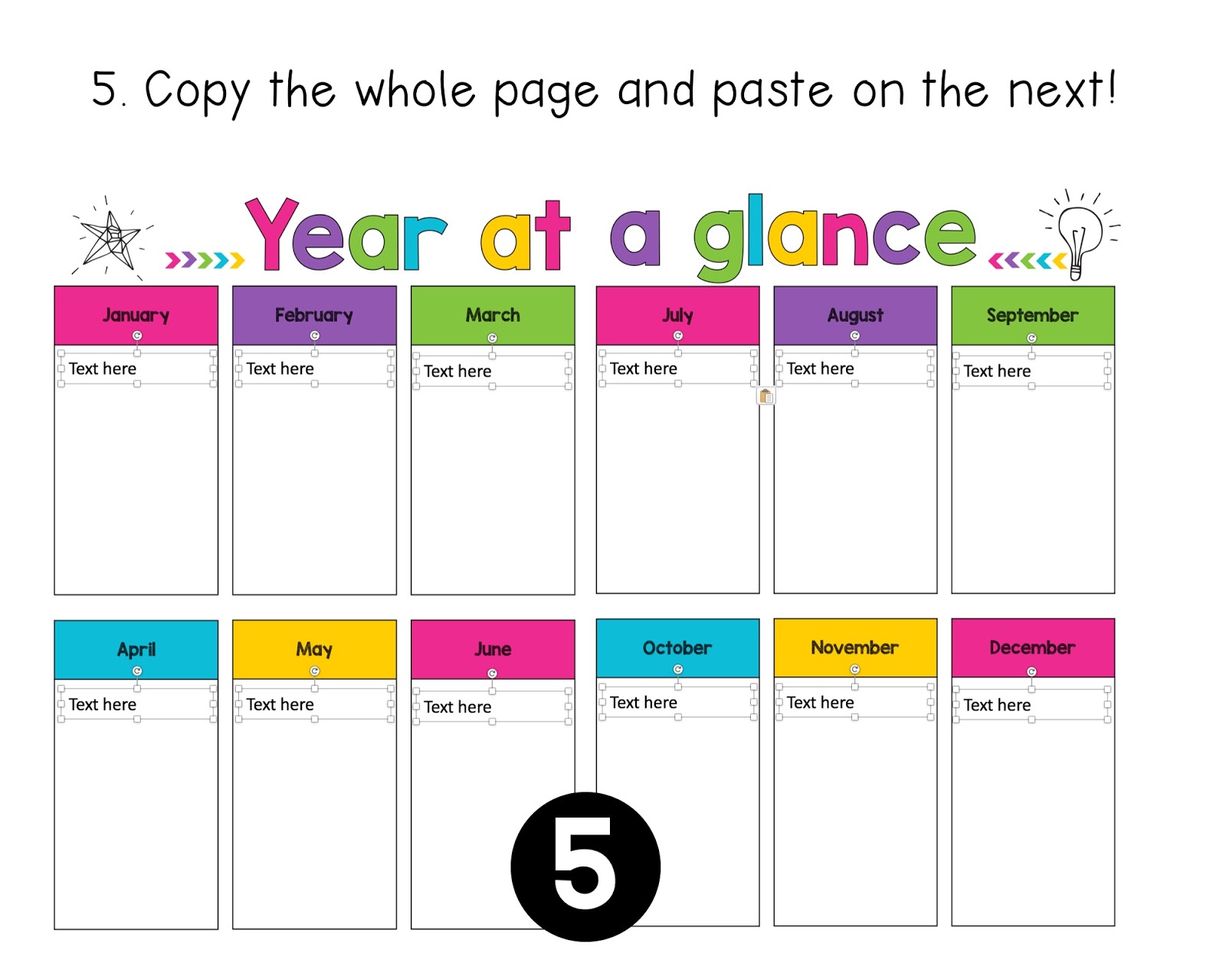
One of the most frequently asked questions I get about my teacher planners is whether they can be used digitally and if so how to set it up. I have not inserted text boxes as some would like to use it as a print and write planner and placing "text here" boxes would interfere with the printing. In order to use my planners digitally, you will need to insert your own text boxes. This might seem like a daunting task, but with these tips and tricks it's not as time-consuming as you would think.

Copy and Paste is your best friend!

A lot of the boxes are the same size and in the same position on each page, so once you have one page set up with the boxes, you can simply copy the text boxes and then paste them onto the next page.


Choosing the right font size

With a table, you can still use a text box and hit enter to move to the new lines. The key to this is choosing the right font size.


If your table has more than one column, simply copy and paste the text box across.


Alignment Lines

One of my favourite things about PowerPoint is the alignment lines that come up when you are dragging items around. These are super useful for making sure that things are lined up properly and evenly spaced.


Here is a visual on how to set up the weekly pages.


I hope this helps you in setting up a digital version of your planner. As always if you have any questions please send me an email or leave a question on my TPT Store!

Friday, 14 July 2017

Writing Rubrics

Writing is my favourite session of the day so I'm super excited to start using these writing rubrics in the new school term!

Providing feedback to students about their progress towards their goals has always been a vital part of the writing session. It usually happens at the end as part of the 'sharing circle'. This is where students read their work to the class and then I provide feedback about their work.

I decided to work on something to make providing feedback a lot easier. Say hello to Writing Rubrics!


These slips of paper come in two different designs; Checklist and Goals.

The Checklist Version contains a list of key writing goals such as spaces between words, capitals, full stops, hearing, recording and proofreading. I decided to level these rubrics to suit the different needs and abilities of the students in my class. Some students would receive a slip with three basic writing goals and others would receive one with five writing goals. The slips vary in the range of skills covered. When marking work, the slip is attached to the page and students receive a tick/stamp in the star for each goal demonstrated. I have made the checklist visual so that students can see and understand each point.


The goals version contains a "big picture" writing goal and then visual representations of other writing skills. Just like the checklist version, the slip is attached to the piece of work. Students receive a tick/stamp in each box that was demonstrated.


As you can see from the pictures, this makes marking and providing feedback easier. Students are also more likely to understand the feedback because it is very visual. These slips allow parents to see their child's progress and what skills they are working towards.

Like what you see? My Writing Rubrics can be found here.

Monday, 10 July 2017

Using Goals in the Classroom

I'm so excited to share this post! I've had the photos for ages all ready to go, but haven't really had the time to put this together...until now :)

"Student Goals", "Student Targets" you've probably heard these two terms thrown around a lot. It can be overwhelming having to incorporate this into everything else that we need to do as teachers. Maybe you're thinking "I don't have time for that!" or "Where on earth do I start?! HELP!". Guess what? It's super easy and will help keep you on track of your data and reporting requirements. Win!

Here is how I have successfully incorporated Student Goals in my classroom for the past two years.

#1 Bump it Up/Data/Goal Wall
These walls have multiple names but pretty much run on the same idea with minor variations. I have a wall for Numeracy, Reading and Writing.


The goals are all written in child-friendly language while still using the technical terms from the syllabus/continuum. Reading and Writing Goals are self-paced, meaning students move to different goals based on their needs and progression. There is no one set path that students progress in.

My Numeracy wall follows the same concept, however, there is a set progression.


I love my Goal Walls as it means that when I'm working with students I can simply look at the goals to see what they are specifically working on. These walls also come in handy during data and reporting time as I can refer to them to help me plot where my students are as these walls are constantly updated.

Added bonus; Students love moving their names from goal to goal!

You can find my Reading, Writing and Numeracy goals by clicking on their names :)

#2 Goal Cards
When working with students in Numeracy, I used to send home their target numbers on a post-it note in the hopes of their parents seeing it and then asking them to identify and count to the number. Only I realised that it wasn't very effective as my students are constantly taking home random pieces of paper and it was getting lost amongst all those. So I decided I needed something a bit more "official".

Goal cards to the rescue!


I had positive feedback from parents about these cards. They were happy be constantly informed about their child's progress and they used the cards to work with their child on what they were working on in class. I noticed a quicker progression as students were going home and working on what we had worked on in class. Yay!

Based on the success of the Numeracy Goal cards, I decided to branch out into other areas.


These cards are not just limited to sending home, you can stick them on desks, use them at rotational activities and clip in books!


With the letters and sounds cards, I stuck them on student desks and turned it into a game. If they can read or identify any one of their target letters they get a point for their table. This has become one of my class' favourite games and it's something so simple! It's also a great way of dismissing students to recess and lunch.

Another way of using goal cards is to clip them to workbooks. This serves as a visual reminder while students are working and eliminates the problem of having to flick through pages to find student work!


Goal cards are not just limited to academics, they can also be used for classroom etiquette. I use them for desk tidiness, chairs and following instructions.


Goal Cards are easy to use and set up. The numeracy, sounds and sight word cards are done in large batches and are updated as the need arises. The writing and etiquette goals are laminated and re-used.

My Individual Goals Card pack can be found here.

#3 Behaviour Goals
My school follows a PBIS/PBL System. So rules and behaviours are defined as being Safe, Respectful and Responsible.

I incorporated Behaviour Goals into my morning routine. These goals are based on the school expectations and use language that is used across the whole school. I change these once most of my class has demonstrated these behaviours on multiple occasions.

My Behaviour Goals can be found here.

Having goals displayed to and referred to on a daily basis has definitely strengthened my abilities as a teacher and helps drive my program so that it targets individual needs. Students are more aware of their learning and what they need to do in order to be able to progress.

I hope this post has inspired you and given you some ideas to try out in your classroom. For all things goal related click here.

Saturday, 7 January 2017

Setting Up Classroom Rules and Expectations

Setting up classroom rules and expectations is an essential part of everyone's 'Back to School' routine. A classroom environment with clear expectations will help your year run smoothly and save you a lot of headaches!

For the past two years, I have set up my expectations in an explicit way which teaches students the expected behaviours for each. I love this system because I find it's very easy to slip into the trap of throwing phrases around such as 'Please work safely', but do students really know what that means? Unless we teach students how they can demonstrate this behaviour, then we can't expect a change or expect them to demonstrate it.

Here are 3 tips for setting up your classroom expectations;

1. Positively Worded Expectations
Expectations are set up in a positive way in an affirmation format. Positively worded phrases help establish and maintain a positive classroom environment. Rule reminders are easy; "Remember, in our class we listen to each other". I have these hung up on my 'Super Students Wall' for easy reference.

Find this here

2. Explicit Teaching - Teach expected behaviours
For each expectation, I made up a social story, which explicitly explained the ways in which students can demonstrate these expectations. Here's an example from 'We listen to each other'.

Find this here.
Students are given examples of what they need to be doing in order to be listening; they need to wait until someone has finished speaking, look at the person, keep their body still and think about what is being said. While we might think these are basic skills that they should already come to school with, we cannot assume that this is true. Each student is different and comes to school with different experiences. Teach what you want to see!

Here are some examples from the other expectations;

Find the bundle, here.

When introducing these, I focus on one expectation a day. It becomes our behaviour goal and I remind students that I am looking for students who can do it. When I see students demonstrating the behaviour, I give specific feedback e.g. "I like the way you are moving safely by walking to the floor" or "I like the way you are taking turns by giving the toy to _____". Children love praise/acknowledgment and you'll find that other students will start doing the same in order to receive the praise too.

3. Ownership
Giving students ownership is important too. An activity which builds ownership is student booklets.
Students can colour and decorate to make the booklet their own. They can be kept in chair bags, tote trays or book boxes for when they need to be referred back to. Alternatively, they can be taken home to be read and discussed with parents.

I like using these books during reflection time. Ask students "What do you need to be doing?" "What can you do next time?".

These three things should help ensure your classroom runs smoothly. Remember, expectations shouldn't just be a start of the year thing. They should be referred to as often as the need arises. If you want to see something, teach it!

I hope this post has inspired you in setting up your classroom expectations.

If you are interested in the bundle, you can find it here. It includes 7 expectation booklets and 7 student booklets.